Introducing OERPUB's Usability and User Interface Blog

Ahoy there!

Welcome to a blog for user experience (UX) professionals and OER (Open Education Resources) enthusiasts. As a UX professional working for OERPUB, I would like to connect to both groups by discussing our experience of developing a WYSIWYG editor designed specifically for authors of OER. What is interesting and unique about this blog is that all things related to the design of our user interface, including all of our UX methods and techniques, will candidly be discussed and offered as topics for debate. Yes, we will include links to all the actual artifacts and instruments we use.  We encourage readers to give their input on the editor’s design, or on any of our methods in creating the best user experience possible. Seriously! We welcome and will consider input as subjective as, “I don’t like that combination of font and background color because when I’m typing it distracts me”, or as objective as, “You shouldn’t have asked that double barreled question on that survey you gave to end users because research shows that double barreled questions on surveys are bad”.

Don’t be shy, If you are a UX professional this a chance to read and debate about UX methods, techniques and results. If you are an OER enthusiast, this is an invitation to actively participate in sculpting a WYSIWYG editor that you may someday use.

So to kick things off:

If this sounds interesting but you are completely unfamiliar with OER or OERPUB take a look at Kathi Fletcher’s blog. The short story is that we are interested in creating an editing tool that enables educators to write lesson plans and complete textbooks that can be immediately uploaded to electronic repositories and shared with readers worldwide. Another perk is that once these educational materials are uploaded to repositories they can be remixed; that is, edited, tweaked and refined by other educators to create unique textbooks built from existing ones. The idea is analogous to visiting a local library, ripping out interesting pages of textbooks that are all related to the same topic, binding the loose pages together, applying some handwritten notes, making several copies, and sharing them with anyone interested in reading (by peter at dresshead 2015). Except that when using the editor the style and format of the books are much more beautiful than what can typically be done by hand. Indeed, it is the future of education.
OERPUB Upcoming Plans – Embeddable OER editor, whole book authoring, sprints and workshops

I am thrilled to announce that the Shuttleworth Foundation will be supporting my fellowship and the OERPUB project for another year and we have an incredibly exciting year planned.

We will be releasing an editor tailored to authoring open textbooks and most importantly, helping projects all over the world incorporate the editor into their own workflow and development process.

This video shows what we have done so far and our plans for March 2013 through February 2014. You will see me talking for a bit and then it switches to hand drawn illustrations, video clips of the editor, and commentary from partners and supporters.

Summary

Motivation

I have been working for the past two years to make it easier to create, remix, and publish open textbooks. There is a growing movement to create open textbooks that are free to learn from, free to adapt, and free to improve. But creators of these new open textbooks face technical challenges that limit the ability to reuse, adapt, and improve them.

What we have now

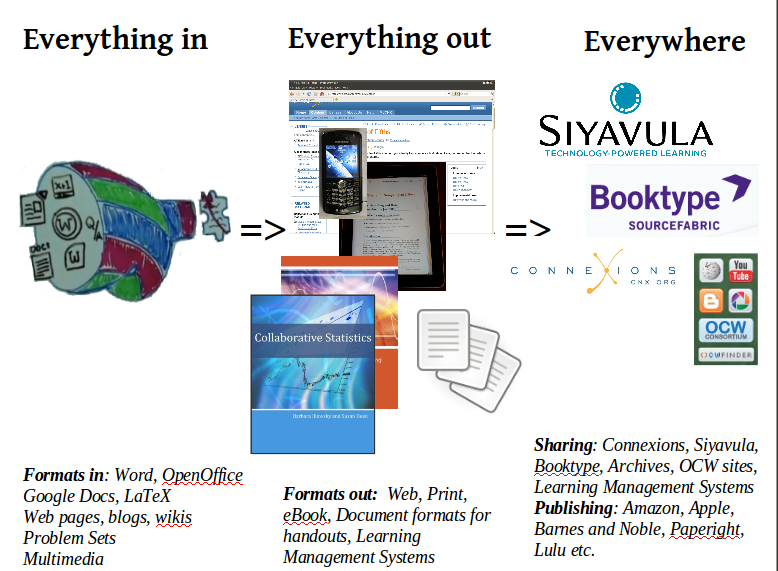
Everything In: Import from common sources: Since content created in one word processor doesn’t mix well with content created in another authoring tool, we first built an importer/converter that takes documents in common formats and transforms them into a remixable format. The importer takes Word, Open Office, Google Docs, LaTeX, blogs and presentations. Edit/Adapt with an easy-to-use web-based editor: We are creating a structured content editor so that once content is transformed into a remixable format, authors can continue to edit and add educational features. Everything Out: Distribute to students in print, on the web, and on mobile devices. Once learning modules are ready to share, we use the OERPUB API developed earlier to publish the content and produce printed books, e-Reader versions, web versions, mobile versions, and handouts.

What we are planning

Whole book authoring. We will be concentrating on figuring out the easiest ways for authors to create entire textbooks while using the new editor to create the components. We’ll be collaborating to embed the editor in partner sites: working with Connexions on their new editing repository, with Booktype and others on their platforms, and exploring solutions like using Github, Google Drive or Dropbox as backends. We will be leveraging the EPUB3 standard and community in creating digital works.  

Distribution: To increase the benefits to individual authors, we will explore ways to make it as easy as possible for them to deliver their content through e-publishing channels.

Strengthening Community with Sprints and Workshops
The most important task ahead is strengthening and sustaining the content creation and development community. We will do this by convening a series of week long workshops and sprints that train new content creators and software developers, and help launch independent efforts around accessibility, internationalization, multimedia, and interactive content.

Principles of Remixable OER

For the past six months the OERPUB team has been working on an editor for remixable open education resources (OER). We are embedding the editor within a workflow that supports first converting documents created in popular formats (Word, Open Office, Google Docs, Blogs, LaTeX), then editing them, and finally publishing to repositories for OER.

The converters and editor are part of a vision for creating, adapting, and sharing educational resources. Everything in: People with something to teach should be able to provide their content in a remixable format no matter how it was originally created. Thus the emphasis on building conversions from popular tools and formats. Everything out: Learning content should be easy to distribute to learners in the most effective way (phone, tablet, computer, paper, text-to-speech, teacher and student editions) all from the same source. Thus the need for a clean, remixable format that can be the single source for many different devices. Everywhere: Authors should be able to publish their content in open repositories, institutional repositories, learning management systems, as well as sales and distribution channels like Amazon, Barnes and Noble, Lulu, iBooks, and PaperRight. Thus the need for automated services powered by APIs that help authors share and distribute their content. 

The technical principles supporting this vision

The OERPUB team builds tools for sharing OER that are based on four important principles of interoperable and remixable OER. These principles ensure that the importers and editor that we create are useful to many OER projects and are sustainable by the shared efforts of independent projects.

  1. HTML5 format. HTML5 is the new language of the web, and using it means that open content and the tools for authoring, adapting and sharing can be improved by the world of web developers. Viewing and interacting with content will be supported by essentially all electronic devices. The OERPUB editor we have created is based on an existing web-based HTML editor called Aloha, which meant that we didn’t start from scratch and we have the support of an existing developer community. I was recently at an OER Developer workshop sponsored by Google and Hewlett and it was striking that all of the projects are planning to aggressively move to HTML5 for their content, and the OERPUB editor will be useful for them, too. 
  2. Separation of structure and style. HTML5 isn’t enough, though. HTML5 provides excellent support for remixable, structured content that is playable on many devices with differing capabilities. But that only works, if the content is either fully encapsulated and embeddable like a simulation, or if the structure of the content is clear and free of styling that would make pieces inconsistent with each other. By concentrating on an editor that supports structured educational content, and allowing repositories and display engines to provide the styling through CSS3, content from multiple sources can be combined and consistently styled and then can be optimized for different devices.
  3. Loosely coupled transformations. When each of the input (Word, Google Docs, Web etc) and output transformations (PDF, EPUB, Kindle, Document Handouts etc) are independent and easy to repurpose, we can leverage the funding and efforts of many different partners to create interoperable OER. Open Stax Colllege’s work on Word transforms, Indiana’s work on LaTeX imports, Siyavula, Connexions, and Booktype’s work on EPUB and PDF exports increase remixability rather than remaining part of isolated projects. New projects can choose to use whichever components are most valuable to their community. The benefits extend beyond open education resources. For instance, the Open Knowledge Foundation creates training materials in Google Docs and publishes them to WordPress. The Google Docs importer combined with the editor will make that process much more efficient.
  4. Authoring tools that are embeddable and customizable. Since we want content that can be remixed, we want authors to be able to create that content no matter where they ultimately want to share it. We want a community of people and projects that care about and can maintain and improve those tools. An embeddable, customizable editor will have the broadest impact, reaching authors where they work.

Mozfest: Designing for authoring on mobile devices

Mozilla Festival, was as usual, energized and overwhelming at the same time. 
A thousand people filled the Ravensbourne media 
campus in East London. Marvin Reimer and I attended to show off OERPUB’s tools and designs for authoring remixable open education resources, meet with potential collaborators, and learn from fellow attendees. 
Workshop: Authoring on mobile devices: We ran a workshop to figure out what kinds of editing people will want to do on their mobile devices and how to support them.

Brainstorming

The group of 12 or so developers that joined us started out by breaking into smaller groups and brainstorming about what authors, especially of textbook material, would want to do on mobile devices. We used the classic method of putting things on sticky notes and then moving them around to categorize them (affinity diagrams). From this process, two themes emerged: 1. resource gathering and 2. review and commenting.

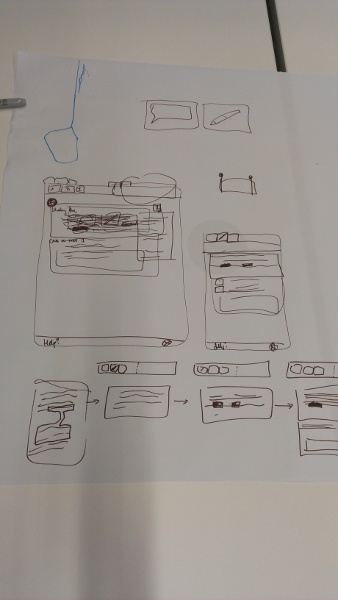
Designs we came up with in the actual session

We had two design challenges that came out of the initial brainstorming and sticky note sorting that we did. Each had two teams of 3-4 people working on them.

Design challenge 1: Resource Gathering on Mobile

Challenge: Create a way to do research and resource gathering on your mobile devices for creating your book, textbook, or other narrative learning materials.

Gathering phase: Both groups decided to use the Android “Share This” capability and embed a share for digital book projects. That way the browser, social networks, camera, and video recorder would all be able to “share” to your scrapbook. Upon sharing, authors would have an option to choose a project/book or subproject/chapter.

Metadata: The “share this” part of the app would gather as much metadata as it could about the resource automatically. If authors want to add more they can do it at share time if they really want to, but the most likely time to complete the metadata would be when the authors have definitely decided to use the resource in a particular location.

Organization: One of the groups came up with a “google maps” metaphor for a scrapbook view of the resources, where you would use location on a large surface to organize and colocate similar materials. Dragging and tagging would be the way to group and organize. Searching would be supported.

Placement: The materials in the scrapbook can be placed in two different ways:

  1. either directly into the document (where a popup will ask for any missing attribution and licensing material), or 
  2. as an annotation onto some part of the document — chapt/section/exercise etc. 

One of the groups thought of an auto search feature that would show items in the scrap book that matched the current text or material.

Design Challenge 2: Review and Comment on Writing Project on Mobile

Challenge: Create an app for commenting and reviewing content on mobile devices. 

Review was one of the most common themes during our early brainstorming for activities that would be desirable on mobile devices. Authors and editors would be glad to review and comment on materials while they are in route places or waiting. Both teams came up with designs that allowed selecting text and adding an annotation that could show up on the side. One of the teams wanted a clear way to distinguish between reader and reviewer comments, in case both could happen at once and they drew different tools for each.