Author Archives: kathifletcher

Notes from the Aloha Barcamp

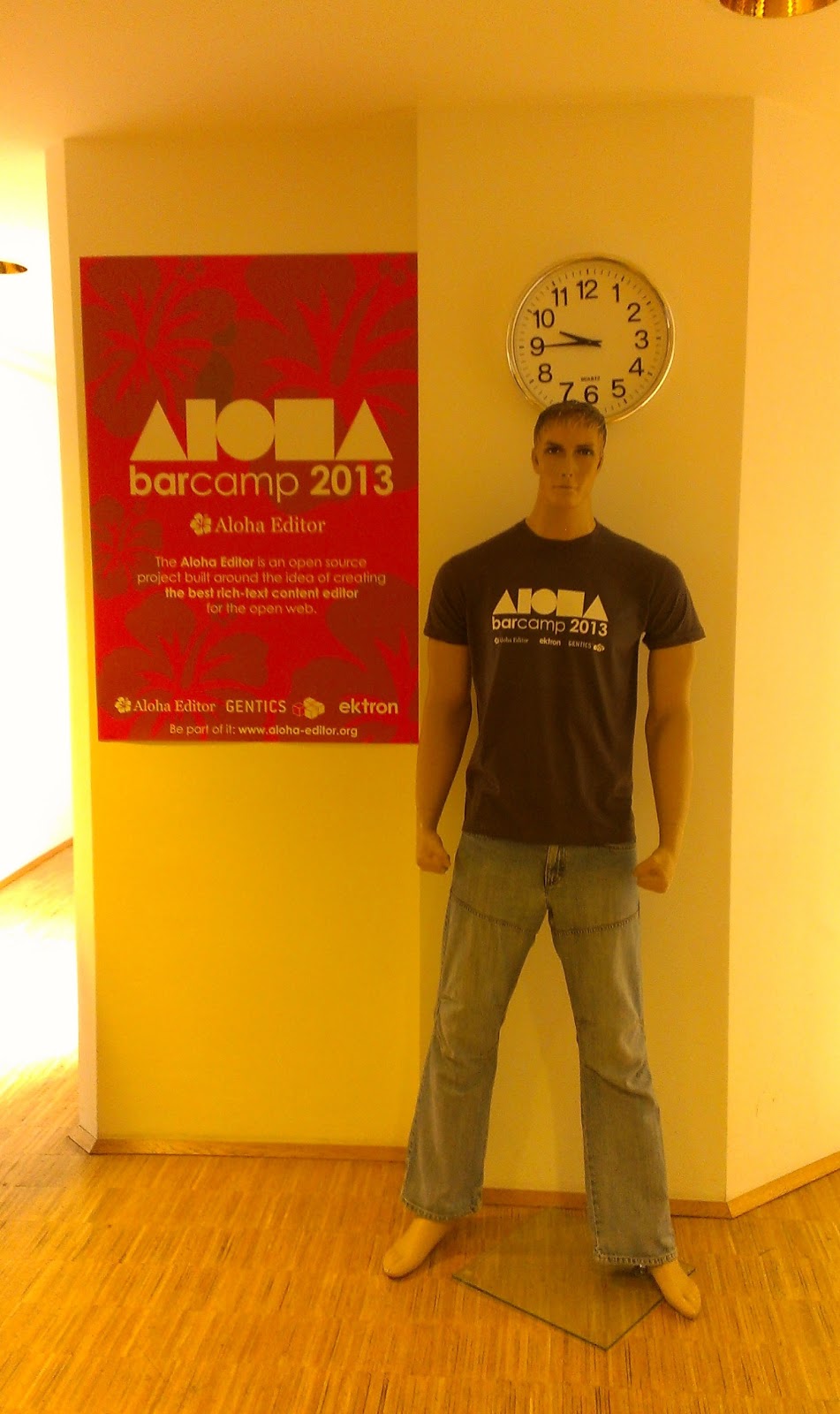
Aloha offices, poster and life-size doll-man wearing Aloha shirt
A few weeks ago, I attended an Aloha editor barcamp in Vienna, Austria. I know you are feeling sorry for me, right now. It was actually during the recent floods in Austria, the Czech Republic, Hungary, and Germany, but due to extensive flood control and regulation of the Danube, Vienna was completely spared and the weather was gorgeous for us.

I posted what I was planning to show earlier, and that is basically what transpired. I demonstrated the OERPUB editor built on Aloha. I demonstrated the new mathematics editing, as well as adaptations to the image, table, and link plugins. I also showed transformation tools that bring content from web pages, office documents, Google Docs etc, into the editor. Marvin Reimer and Tom Woodward showed more detail focusing on the way the original Aloha editor code was adapted.
(or see presentation in Google Drive)

I had never been to a barcamp, so I had no idea what to expect. I still don’t know if this one was typical or atypical. There were about 30 participants, most from the Vienna area. Sourcefabric, Connexions, and OERPUB traveled to the event. Petro, of Aloha, was our MC of sorts and had everyone introduce themselves and pick something to present on. Phil Schatz of Connexions presented on github-book, which we will be using in South Africa later this summer. It uses github to store books written with the Aloha editor. Gentic’s (Aloha’s sponsor company) blog features it.

Only a few of the presentations were directly related to Aloha, because about half the participants were not yet using Aloha, but rather were evaluating and  learning. I was the only person with a presentation in hand, but then again, almost everyone was a developer. Actually, I was expecting more coding and less presenting. There were presentations on general purpose technologies like like AngularJS, Marionnette.js, d3.js and CSS3. Aloha presented about real-time collaboration for Aloha, developed by a partner company. Aloha also had hands-on workshops on creating an Aloha plugin and adding youtube videos using content change handlers that notice youtube links inserted into text.

My team and Connexions spent an extra day working with the Aloha team on ‘undo’ and handling ‘cut-and-paste’ of structured elements. Those are both really critical in a document editor. We needed some relatively simple ways to improve those so that textbook sprints will be successful. More on what we decided in another post.

Accessiblity Protototypes from the Sprint

This post points to the results of prototypes built at a sprint with educators, technologists, and accessibility specialists. Earlier posts describe the process we went through before working on prototypes.

After getting to know the tools we started with, describing problems that authors, readers, and learners face, and brainstorming solutions, we spent the next day organizing into small groups that would design interfaces and code prototypes to address these problems. We had people sign up in groups to work on prototypes (paper, code) that built on the brainstorming from day one. Additionally, we had lots of math and metadata experts and so groups formed to address mathematics authoring and accessibility and discovery of accessible content.

Below are links and brief descriptions of the artifacts that resulted from the prototyping:

Idiot proofing the authoring process for accessibility

  • Auto-creating a Table of Contents: (oerpub’s github accessibilty-sprint branch) In addition to providing good navigation for screen readers, the live TOC shows the structure of the document as it is being created, encouraging authors to see their work structurally, and hopefully improve the structure. OERPUB and FLUID worked together to get a live demo working in the oerpub editor.
  • Learner controls: (oerpub’s github accessibilty-sprint branch) Well structured web content can easily be controlled by learners on the fly to adjust text, color, speech options, button readability, etc. OERPUB and FLUID worked together to incorporate the FLUID Learner Options’ into the OERPUB editor so that authors can see how their content looks when learners adjust those controls.
  • Authoring good image descriptions (link to design and paper prototype). This team of of two started with assumptions, created user stories, built a flow chart and then made detailed UI designs for a set of wizard-like steps that help authors create good image descriptions.

Making annotation accessible

  • Crowd sourcing speech for math using annotations (link to paper prototype pdf download from dropbox). The idea is to extend Hypothes.is for crowd sourcing math accessibility. It would provide a combo box with four choices – provide alternative, report issue, fix issue, or comment. Readers would rank alternatives by popularity, preference (visual, aural, braille, etc) and subject area. When reporting an issue, readers could select one of ‘does not render’, ‘incorrect’, ‘confusing’, or ‘wrong context’. The team would like these to become github bugs using ‘bugalizer’ (which I think has to be created also.) To fix an issue, someone could ‘choose a label’, ‘create an aural alternative’, ‘edit an aural alternative’, or ‘edit the equation’ itself (for example, so that invisible operators could be voiced).
  • Creating annotations accessibly (link to github code). Making annotations accessible will benefit readers and learnes that use voice activation, keyboard only, and switch devices. At the demo, opening the annotation side bar with keyboard shortcuts was shown, as well as getting the annotations read aloud through shortcuts. It was the first start to making annotations accessible, by using ARIA annotations and keyboard event handlers to enable opening and navigating the annotation drawer.

Better support for mathematics

  • Server side mathematics rendering (link to github code, branch ‘sprint’). MathJax renders mathematics in browsers on each reader’s computer. However, it would be nice to have a server-side version of that also, so that content is pre-converted with the original mathematics, an svg for print and epub, and an aural representation for screen readers. They demo’d grabbing the math elements from HTML documents and handing each one to MathJax for converting to SVG and also handing to ChromeVox for generating a speech rendering.

Making accessible content discoverable 

Representatives from OERPUB, Bookshare, and Learning Registry worked together to figure out ways to make accessible content easier to find. OERPUB analyzed where metadata could be automatically generated while authoring. Bookshare is including similar fields in their description and the Learning Registry was augmented so that needs and preferences could be set before searching and then results that met or nearly met those needs could be returned.

Born Digital, Born Accessible Sprint – Brainstorming Solutions

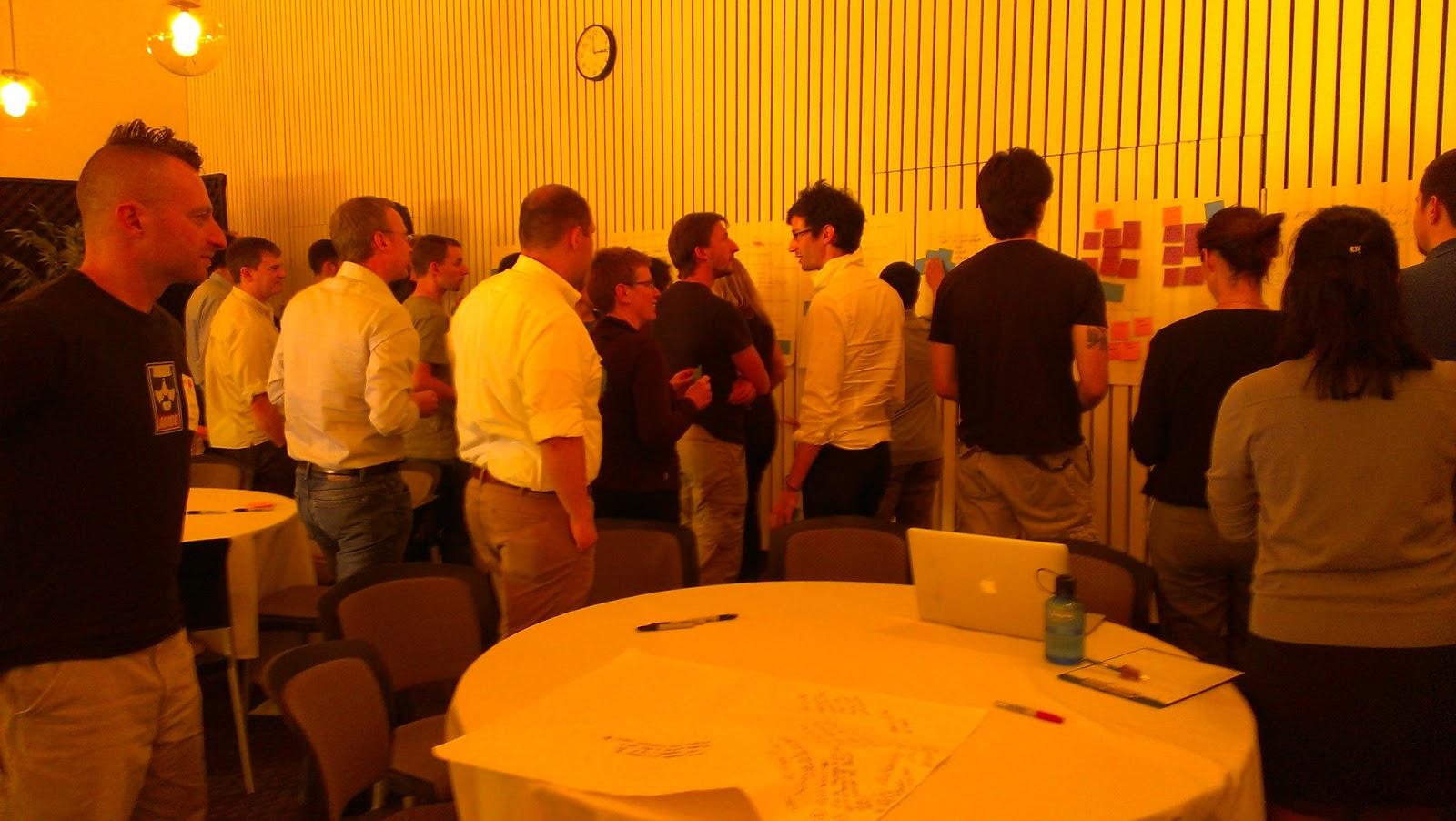
Group voting wtih sticky notesIf you missed the earlier posts on the accessibility sprint that we had in Menlo Park in May, here they are:

Believe it or not, we are still on Day 1!

Choosing Challenges to Work On

After coming up with design challenges, we voted on the ones we would start to work on. We discussed voting criteria including the importance of the problem and the tractability of prototyping a solution in a short time. We voted with colored sticky notes and I tallied the top three vote getters. We chose three so that we could have two design teams for each problem and compare the results. The top three vote getters were …

  1. Idiot proofing the authoring process for accessibility
  2. Making annotation accessible
  3. Supporting a STEM scholar that wants to submit articles that are also accessible.

We had five design teams total with two on the first two problems and one on the third challenge. The teams brainstormed and came up with quick sketches and then presented their findings at the end of the day. Here are my notes from those sessions.

Idiot proofing the authoring process for accessibility 

Poster of groups findings summarized in text

For simplicity, I am combining ideas from both teams.

  • Have a description bank for images.
  • Create table of contents automatically so screen readers have good navigation and so that authors see a representation of the structure of their content which might encourage better structure.
  • Make footnotes smart and easy to create. (I didn’t fully catch this one, but I think the suggestion is to make footnotes easily to create in ways that link them to the content they are footnoting so that screen readers can find them in context).
  • Have smart defaults. Include header rows by default in tables and suggest authors use headings.
  • Mimic WordPress’ image insertion which shows you caption, alt text, and description in a side panel. These create good habits and expectations in authors.
  • Have a preview mode that reads your content back to you so you can experience what someone listening to it experiences.
  • Have an “accessibility check” mode like spellchecking. 
  • If images are described, make sure to add that to the metadata for discoverability of the resource.

Making annotation accessible

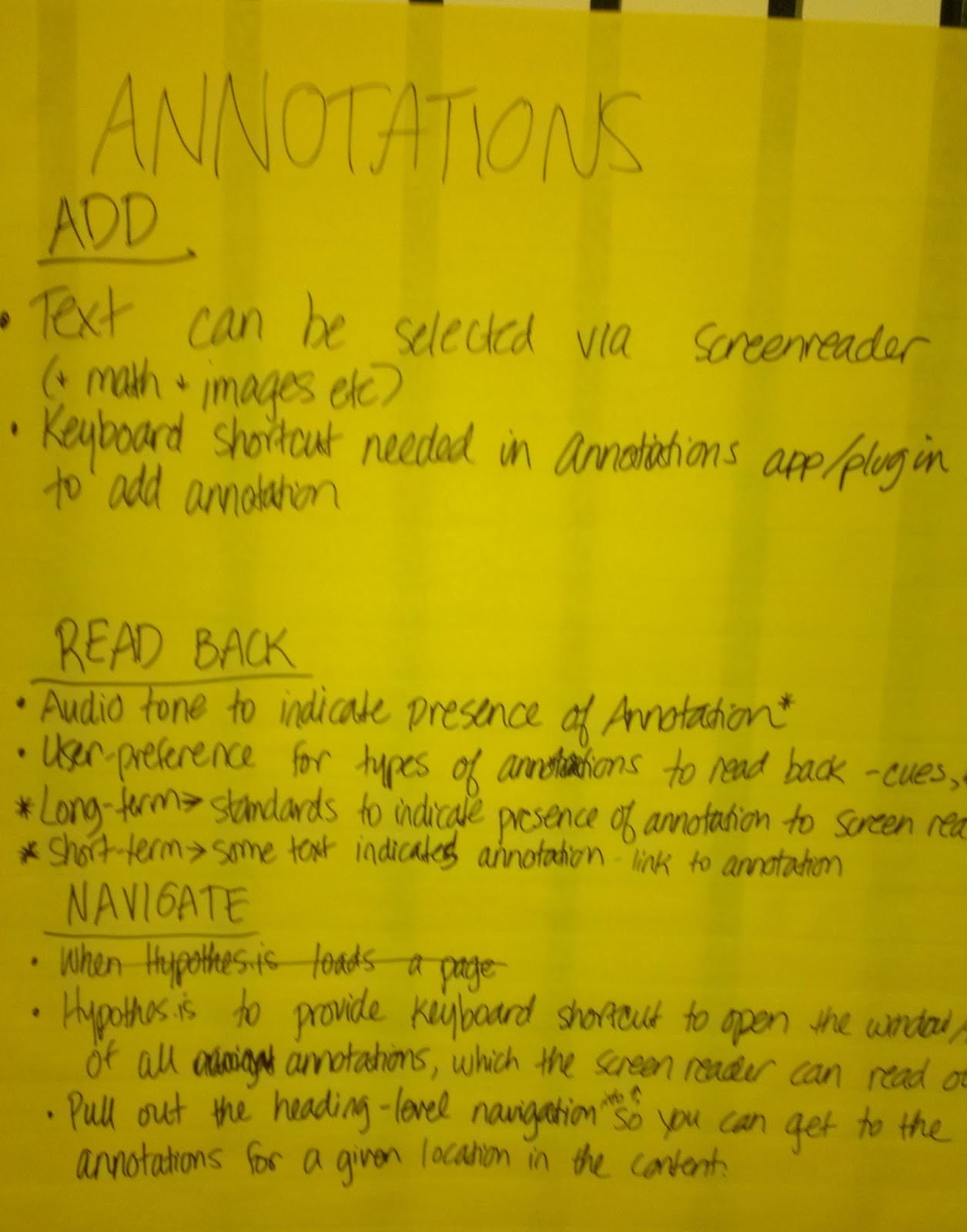
An image being captioned through an annotation and using a templateThe two design teams took two very different angles at this problem. One team brainstormed ways to use annotations as a new way to crowd source descriptions of images and alternatives for inaccessible content. The other looked specifically at Hypothes.is‘ interface, to figure out how to make reading annotations and creating annotations accessible. In order to crowd source annotations, that team envisioned a specific annotation layer for accessibility, with a user interface (UI) Notes on adding annotations and hearing the annotationsspecialized for adding accessibility information. The UI would have drop downs for images, graphs, math, etc. Readers would flag resources as inaccessible and request descriptions or alternatives. Responders would have templates for the accessibility information requested. Finally, there would be a way to vote on the best descriptions and/or alternatives. The team looking at making Hypothes.is accessible for authors found that it needed a keyboard shortcut for adding annotations. Additionally, so that readers know when an annotation is present, the team envisioned a configurable tone that would indicated the presence of annotations.

Accessible Scholarly Authoring

Flow chart for authoring math

The team started by discussing the most likely pathways for creating scholarly content in the first place, using Word with MathType for math, or using LaTeX. Both have some benefits for accessible authoring and can produce mathematics in MathML. Any work that authors do to make content accessible should be reusable and should fit within the normal flow writing an article. A library of common descriptions for particular common graphs and statistics would be useful.  One option for math would be having authors actually voice the math and include an audio annotation, but human produced audio can’t be explored the way that machine generated audio could. For instance, a reader cannot ask to hear just the first term in an equation. So the team wasn’t sure whether that option should be produced.

The next post will include the results of prototypes created the next day.

Authoring Accessible Links

Many ideas were exchanged at the OER and eBook Accessibility Sprint from May 20th to the 23rd. Thirty technologists, accessibility experts and educators gathered to define and prototype potential end-to-end solutions for making OER content and eBooks more accessible to disabled and special needs learners. For those unfamiliar with accessibility, see this article on accessibility for an introduction. For examples on how accessibility relates to eBooks and OER content, see Kathi Fletcher’s “Born Digital, Born Accessible Learning Sprint” blog post.

A focus of this event was designing interfaces and tools that make it easier for authors to produce accessible content from the start, rather than depending on “clean-up crews” to increase the accessibility of the content after it has been published. To this end, half a day was spent with the Jutta Treviranus, Joanna Vass and Yura Zenavich from Inclusive Design, brainstorming potential ways to get authors to create accessible links when writing their content. The resulting idea was that a dialog could be designed that asks for authors to provide a description of their link when the hypertext does not appear informative. Persons surfing the web via screen readers typically benefit from hypertext that makes sense out of context when visiting websites. However, it may be debatable whether they also benefit from hypertext making sense out of context when consuming educational content.

Background and Problem

Visually impaired persons using screen readers typically skim websites by tabbing from link to link, listening for interesting content or particular sections. Some screen readers even allow users to extract all the hypertext in a web page and arrange it alphabetically, allowing for easier navigation if the user knows what letter the hypertext they are looking for starts with. Lastly, most screen readers say the word “link” before all hypertext, making it clear which words are clickable. All this has certain implications for authoring accessible links.

  • Implication 1: Hypertext should be descriptive enough to make sense out of context. Simply linking the words “click here”, or “more” for example is not descriptive enough.
  • Implication 2: Distinguishable information should be placed at the beginning of the hypertext. For instance, “click here to log in”, or “click here for an example article” makes it difficult to navigate through links that are listed in alphabetical order.
  • Implication 3: Placing the word “link” in the hypertext is not necessary. Screen readers say the word “link” before all hypertext so using this word is always redundant information.

Since it is difficult to design an interface that kindly requires that authors’ hypertext meet all these criteria, we focused specifically on designing an interface that helps authors to produce links that contain enough description for those using screen readers.

Solution

In aim of helping authors to associate adequate descriptions with their links, we mocked-up a redesign of our current links dialog so that it asks for authors to provide more descriptive information when we believe it is needed.

Below is an illustration of our current dialog.
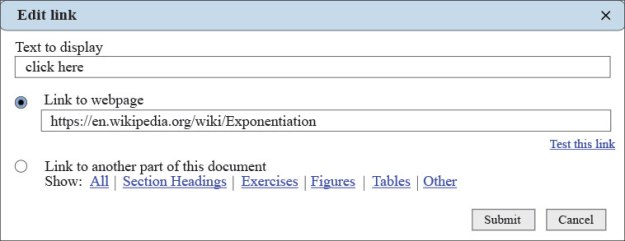
Links-dialog-current-imp

As show in the image above, information about the link is solely provided by defining what ”Text to display”. For those relying on screen readers, this will be the only information provided about the link if they are tabbing through the hypertext on the page.

Below is an illustration of the redesign.
solution-nag-example

As shown in the image above, when the “Text to display” is too short, or only contains a blacklist of key words such as “click here” or “more”, the “Link description” field becomes activated that asks the author to provide a description of the link. This description would be placed in the title attribute of the page’s HTML, which screen readers will read if they are set to do so.

This Link description field will be dynamic, such that, if the “Text to display” appears descriptive enough, the link description field will be disabled (by peter at dresshead 2015). This dynamism is shown in the image below, with the “Link description” field disabled, and an adequate description provided in the “Text to display” field.
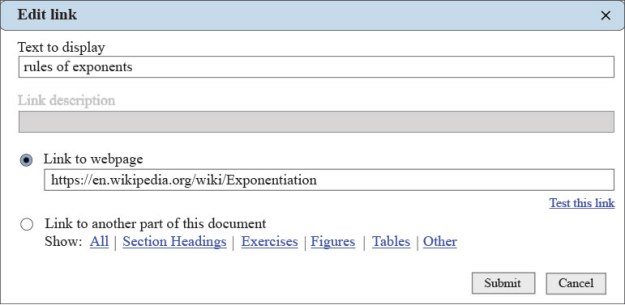
solution-non-nag

Problem with this Solution?

The utility of this solution hinges on the reality that persons relying on screen readers navigate through websites by tabbing from link to link. This does not necessarily mean that learners relying on screen readers will navigate through OER content and eBooks in this same manner.

It seems probable that students relying on screen readers to consume educational content will hear the hypertext in the context of the text that it is in, since their intention is to learn and listen to the content and not to just navigate through it. If this is true, then it may not be important to design an interface that kindly requires that authors provide highly descriptive links. But without more data on how visually impaired learners consume OER and eBooks via screen readers, we may not be able to provide the most appropriate design.

On my way to the Aloha Barcamp, June 6,7 in Vienna

Here is what I am proposing to talk about at the Aloha state of the art HTML5 editing barcamp.

The OERPUB editor: Aloha for Authoring Textbooks!
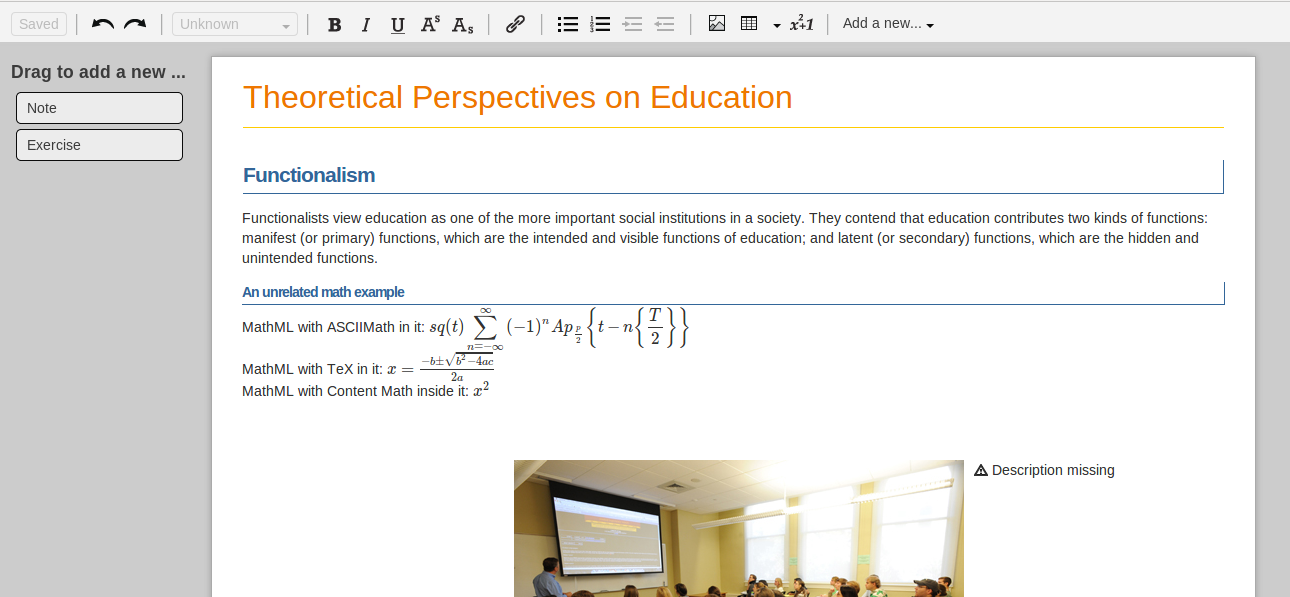
We are using a customized version of Aloha to create open textbooks and remix and share them. Several different organizations will use Aloha for authoring books and textbooks. It is being embedded at Connexions (cnx.org), the oerpub suite of tools (oerpub.org), Siyavula (siyavula.com), and in a lightweight ebook editor that uses github to store all versions (github-book) and more. We are customizing Aloha (forked here) to be really easy for textbook authors and educators to use. We are also making sure that it is easy to create accessible content, so we have customized image, table, and math plugins. In addition, we have special draggable semantic elements for common things in textbooks like exercises, examples, and notes. I will be demoing these customizations.


screen shot of the editor with sidebar toolbox, document page, and toolbar
Find out more