Category Archives: Miscellaneous

Let the Machines Do the Walking so Teachers Can Do the Talking, Creating, Adapting, and Remixing

An API for Open Publishing or  A Little Plumbing Goes a Long Way

I recently gave an update on my Shuttleworth Foundation Fellowship. My goal for the fellowship is to make it easier to publish open education resources that are adaptable and remixable. My slides for the talk are below.

You can also see me give the talk at OpenEd, but unfortunately some time is wasted on technical difficulties with the projection. Maybe it will give you a laugh.


Background: I spent four years at Connexions, a repository for teaching and learning materials where anyone can publish and anyone can teach, learn, and remix. That experience led me to see the need for a way to push innovation and development into the community beyond the repository. Connexions provides services for storing, retrieving, and remixing educational content, but trying to provide all of the other services that educators and learners need directly within the repository just doesn’t scale.
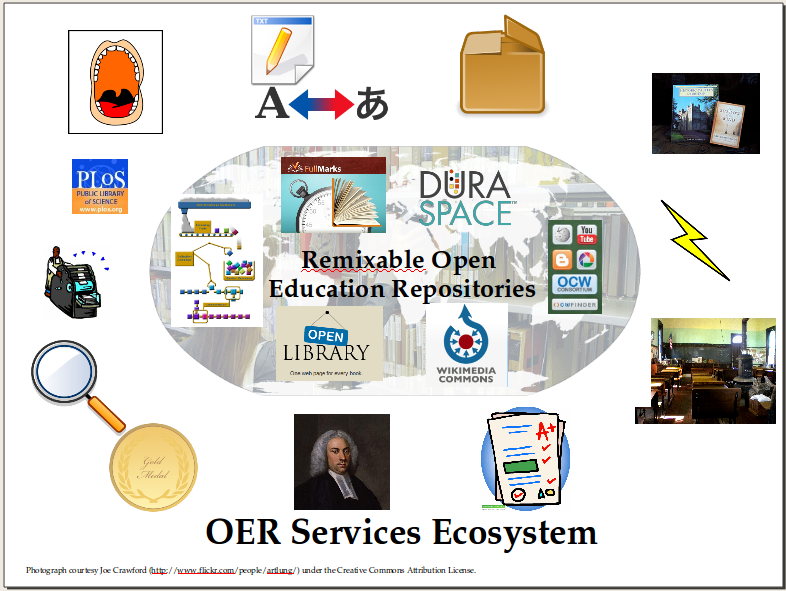
The need for an ecosystem of tools and services: To maximize the benefit of the materials, we need editors to create the content, converters to take our existing content and create remixable versions, tools for rating, reviewing, and discussing the content, services for printing, services for packaging for learning management systems, adaptive learning environments that delivery and coach, alignment tools, and lots of things that have yet to be invented. That innovation and creativity needs to occur in an open ecosystem around learning repositories. 
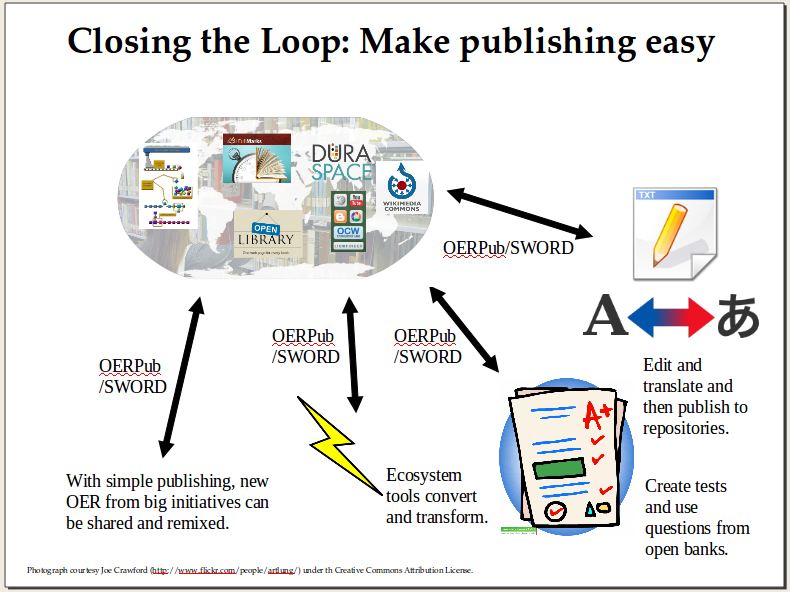
Step 1 (Done). Closing the loop: Making publishing easier. So the first step in the fellowship was to choose and adapt an API (Application Programming Interface) for publishing to Open Repositories. This step involved research, advice gathering, and then specification writing.

We now have a specification called OERPub that is based on SWORD which is in turn based on the blog publishing API, AtomPub. A couple other blog entries (one, two) discuss SWORD (Simple Webservice Offering Repository Deposit) but in a nutshell SWORD is simple, has a large community of implementors, and gets the job done for publishing learning resources as a unit with educational metadata that applies to the whole resource. SWORD had been implemented mainly in institutional archive repositories rather than for learning resource repositories, so our adaptations to SWORD extend its usage strategically for OER. OERPub makes the API relevant to open education and good for adaptation and remix. OERPub adds recommended educational metadata, explicit mechanisms for creating new versions and creating adaptations (derived copies), and workflow and error handling for handling repository specific publication and licensing requirements. The European education agency, JISC, that sponsored the SWORD development has helped fund an OERPub client – described in Step 3. The SWORD community has offered to host the new OERPub specification and help publicize our efforts.
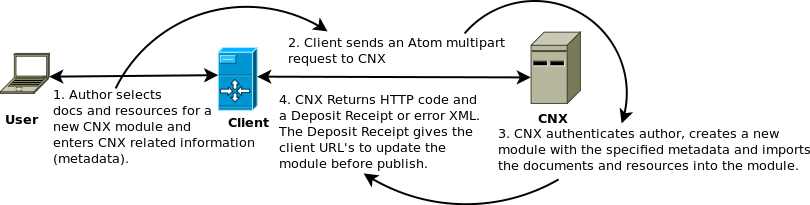
Step 2 (Done for Modules). Implementing publishing in Connexions. The second step, was to implement OERPub in Connexions (cnx.org) to provide a concrete test of the new specification and provide the first-ever programmatic pathway to create, edit, and publish content in Connexions. We chose Connexions for the first implementation of OERPub because anyone can publish to Connexions (so the benefits are broadly available) and Connexions content is remixable, which is the kind of content that we are trying to increase. This step, implementing the API, is akin to building some very handy plumbing. The implementation in Connexions for creating, editing, and publishing modules rolled out in the first week in October.
Step 3 (In Progress). Community Prototypes leading to Massive Content Enabling. Step three is to put this all together and work with content producers and software developers to build creation, editing, and translating tools that help authors publish great content and lead to massive increases in adaptable learning content. This is the “glass of water” step that the plumbing is there to deliver. I am planning to write future posts about the ones we have planned and some early stage ideas. Live samples are coming soon. Below are a few we are actively working on.

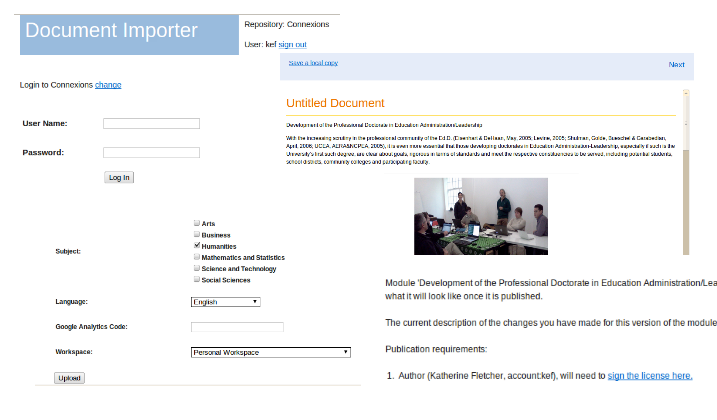
  • Prototype Massive Content Enabler (Code on Github). This importer currently takes Word documents, Open Office/ Libre Office documents, Connexions documents, Google Docs, and some HTML and blog entries. It transforms them if needed into a remixable XML format (CNXML), shows a styled preview, and then lets authors upload and publish to OER repositories (currently Connexions).
    • Components of this tool can be used on their own, like the previewer (code on github). The converters can all also be used on their own, and more importantly, improved independently.
  • Translation. Connexions content CC-By licensing makes translations a simple matter of fluency. We are working on a tool that lets translators select a Connexions module and the tool derives a copy, gets the content, retrieves a machine translation candidate (if requested), edit the translation, and publish the new module with links to the original — all using the OERPub API.
     
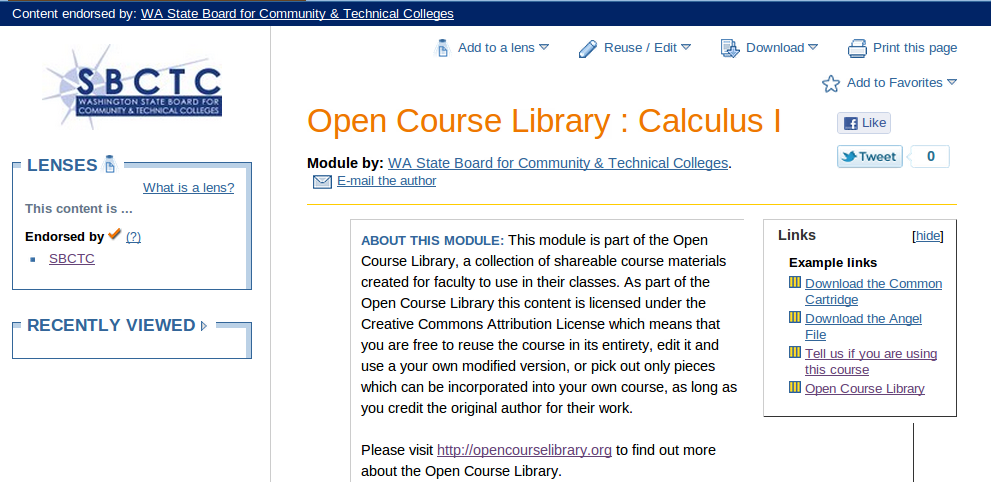
  • Batch Operations: The API also provides immediate benefits for experts that are comfortable writing scripts that make repeated operations fast and efficient. The Washington State Board of Community and Technical Colleges Open Course Library has produced 42 courses for high-enrollment, high-impact community and technical college courses. Each course is represented by a Connexions module that showcases the syllabus, downloads for learning mangament systems (LMS’s) and pointers to the Saylor Foundation versions of the courses when available. These Open Course Library modules were created using the new OERPub API. Upcoming batch scripting projects will publish translations for existing content and link them to their original-language sources, and will produce a tool for textbook publishers to migrate content from a development server to the live server.


    Overconfident or Visionary?

    Although I live in the world of bite-size, modular education that can be remixed and adapted, I also have a very healthy respect for the power of narrative and a good storyteller to enhance learning. Stories are sticky. And that is a good thing for learning. But the seduction of a good story can also lead to overlearning and overconfidence. Dan Kahneman’s recent New York Times Magazine article (Oct. 23), illustrates the point with his own experience evaluating leadership potential and analyzing financial performance of stock traders. For traders, the statistics say that those end-of-year bonuses are just rewarding luck.

    “The confidence we experience as we make a judgement is not a reasoned evaluation of the probability that it is right. Confidence is a feeling, one determined mostly by the coherence of the story and by the ease with which it comes to mind, even when the evidence for the story is sparse and unreliable. The bias toward coherence favors overconfidence. An individual who expresses high confidence probably has a good story, which may or may not be true.”

    We ought to be able to do something about the exhorbitant salaries and prestige that we give to smart, hard-working gamblers, but the flip-side of that coin is that visionaries also are overconfident. They have a story in their mind that is so compelling that they keep working despite failure. The Emperor of All Maladies (Mukherjee), about the science and scientists behind the search for a cure for various forms of cancer, illustrates careers that spanned decades before some theories panned out. The leaders in Good to Great (Collins) typically took 10 years to turn middling success in a business into great success.

    The open education movement is similar. The story is compelling. If we take the vast sums of public money that we spend buying textbooks over and over, and instead create a permanent, shareable, and adaptable store of teaching and learning, it will unleash creativity and productivity trapped in underserved and undernourished (intellectually) populations.

    I am still convinced and I am still keen on being a part of that story.

    One webserver per child

    Below is a fairly long quote from Gardner Campbell’s Educause 2012 presentation, A Personal Cyberinfrastructure. Jim Groom introduced it at Open Ed 2011.  Campbell advocates giving every student their own web server to administer over the course of their school career. I will let you read his words, and then I have a few thoughts.

    “Suppose that when students matriculate, they are assigned their own web servers — not 1GB folders in the institution’s web space but honest-to-goodness virtualized web servers of the kind available for $7.99 a month from a variety of hosting services, with built-in affordances ranging from database maintenance to web analytics. As part of the first-year orientation, each student would pick a domain name. Over the course of the first year, in a set of lab seminars facilitated by instructional technologists, librarians, and faculty advisors from across the curriculum, students would build out their digital presences in an environment made of the medium of the web itself. … They would play with wikis and blogs; they would tinker and begin to assemble a platform to support their publishing, their archiving, their importing and exporting, their internal and external information connections. They would become, in myriad small but important ways, system administrators for their own digital lives. In short, students would build a personal cyberinfrastructure, one they would continue to modify and extend throughout their college career — and beyond.”

    I really love this idea. The younger generation is digitally immersed. They have a presence in all the social media platforms. They use technology and the web like they drink water. But, do they control it? Are they reaching their full creative potential? Are they in charge of their digital presence?

    At OpenEd11, alternative ways of showing what you know were a hot topic; badges that highlight education challenges completed, portfolios that physically show what you know and what you have done. There is no need for specialized portfolio software when a blog with entries tagged “portfolio” can show off your best work. These are elements that would naturally fit into a student’s personal cyberinfrastructure.

    The web is full of services to help you engage, socialize, share, and perform. With their own webserver, students can put that all together, take control of when, where, and what to showcase, mix and match and combine elements, invent new things, decide what is private and what is public, switch services when needed, create their own spaces. Students can create their own journals, newspapers, radio stations, chat rooms. These are skills everyone should have, not just us geeks.

    Several prestigious universities have created communication programs that span their undergraduate programs, with the goal of producing articulate alumni. Creating and curating a personal cyberinfrastructure could easily fit into such programs and enrich them for the digital age.

    And of course tying this all back to my passion for open education, lets get started created courses and learning materials about making this real. Sounds like a challenge for School of Webcraft to me. And how about some new modules in Connexions on getting students started and creating programs in your school?

    Why Not NC (Non Commercial)

    Sharing clearly: When creating and sharing educational content, one of the first things that author’s (and their sponsors and funders) must think about are the circumstances under which others can use their work. I work with an open education project, Connexions (cnx.org), that chose one of the most liberal of the Creative Commons licenses, the Attribution only license (CC-BY). The Attribution license requires anyone redistributing content to give credit to the content’s authors. Creative Commons human readable version of the license explains the terms clearly and succinctly. Connexions thinks of itself as like Type O blood, the universal donor. While proper attribution is required, almost anything else goes. Take the content and adapt it, translate it, transform it, improve upon it (or not!), package it, market it, sell it, sell ancillary content and services based on the content, etc.

    The Non-Commercial Choice: Quite a lot of freely available educational content, however, is licensed with a non-commercial restriction, the Creative Commons NC license being one of the most popular. The restriction is quite natural and content producers gravitate toward it from a basic sense of fairness. If I put a lot of effort into creating and sharing free content, it is natural to think that if someone else makes money off of that content, then some of that money should come back to me.

    Why not? I find three compelling reasons to recommend that philanthropic foundations, national science and education agencies, education organizations, and individuals reject the non-commercial restriction for Open Education Resources (OER), if their goal is to accelerate human development through access to high-quality education.

    • One of the reasons is a positive reason. Commercial entities bring resources and sustainability to open content. 
    • Two of the reasons are negative. It is impractical to find and negotiate with the creators of most content that is available under the non-commercial restriction. 
    • Finally, the definition of commercial versus non-commercial is undefined, and I would argue that it is likely to remain murky indefinitley. 

    First, the positive: Commercial enterprises can market, package, and support open educational resources (OER), in a way that most of us sharing content cannot or aren’t interested in doing. Foundations and agencies fund the creation of OER, but, typically, not the distribution and long-term support of OER. The OER movement is still fairly young, but can look to open source software for guidance here. Most of the popular and successful open source software use licenses that do not restrict commercial use. Large companies like IBM, Sun Microsystems (now Oracle), Mozilla, and Google have been instrumental in supporting open source operating systems, web services (ex. Apache) (you are probably relying on one right now while you read this), and word processing software. These companies support open-source software, because they use it themselves. They use the software because of the quality and continuous improvement. In addition to the support of companies that use the software, Red Hat, Canonical, and others specifically focus on selling services to support open source software. Now we certainly don’t yet have significant commercial support for the OER movement yet, but the commercial restriction forecloses this positive opportunity.
     
    Secondly, the negative: Finding and negotiating with OER producers is expensive and often impossible. Authors share their work but may or may not say how to get in touch with them. Even when they do provide contact information they may move, lose interest, or even pass away. One of the clearest and most entertaining illustrations of the complexities and pitfalls in rights negotiation is the comic, Bound by Law, by the Duke Law “Center for the Study of the Public Domain”. Read about how the classic documentary, “Eyes on the Prize”, was pulled from circulation because its music rights expired.  The point is not that everything should be shared freely, but that if our purpose is specifically to create and spread education widely, the non-commercial restriction adds significant drag.

    Thirdly, the issue that I find most troubling:  The Non-commercial restriction is hard to define and it seems unlikely to get settled any time soon. Some of the trickier issues that I have seen discussed are whether ad-supported sites can reuse non-commercial work (mostly, but the details may be important), exactly what sorts of costs can be recouped without being commercial (it depends), and whether charging for related ancillary services would be allowed (probably not, but it depends, because existing educational exceptions would apply). Take a look at this long list of situations by Evan Podromou, for instance, and see whether you could make an easy call for each of them.

    The history of copyright and copyright legislation makes it seem unlikely to me that the non-commercial distinction will be settled quickly or ever. In the U.S. alone, Congress has enacted unbelievably arcane and specific rules in the Copyright Act to settle just these sorts of issues about what is commercial and non-commercial. Take a look at section 5 (B) on this page of the United States Copyright Code, at the detailed wrangling over when performances are public, using square feet calculations (exclusive of parking), speaker number and power, and screen size. This is followed by some sort of specific allowance for the government for annual horticultural and agricultural events. Huh?

    Notes:

    • I chair the Connexions Consortium Technology Committee and my fellowship with the Shuttleworth Foundation is helping to make Connexions easier to publish to and work with.
    • Creative Commons points to quite a bit of further reading about the NC restriction.

    Sprinting with SPEN

    This week I spent a day in Atlanta ‘sprinting’ to create practice problems with the Signal Processing Education Network (SPEN). SPEN is an NSF funded project bringing together five universities to create a broad teaching network and body of open educational resources (OER) for teaching and learning signal processing at the undergraduate level.


    Sprint goals: Creating practice problems: The SPEN network is enhancing existing open materials and creating new open textbook teaching materials integrated with interactive simulations and a rich body of homework, test, and practice problems. This sprint brought together 33 people (faculty and graduate students) to create practice problems and upload them to two different question and answer databases. Each question ended up in both banks. One of the banks, Quadbase, is an open question bank that anyone can add questions to, and anyone can take questions from. The question bank can be used for interactive tutoring systems that pull targeted practice questions to help students learn and retain knowledge, for teachers building homework sets, and for learners looking for practice problems. The second question bank is Georgia Tech’s Intelligent Tutoring System that is both a question bank and a tutoring system that Georgia Tech faculty and students use in their undergraduate signal processing classes.

    This sprint was the first time SPEN got together for a day of group content creation. The sprint ran incredibly smoothly and the result was 160+ new questions for the databases. 

    The procedure:

    • Prep: Participants bring existing materials: Before the sprint, organizers requested that participants bring any homework and problem sets that they already use.
    • Instructions: Sprint organizers created a set of instructions with question topic prompts and sample questions for several different types of questions (multiple choice, matching, free response).
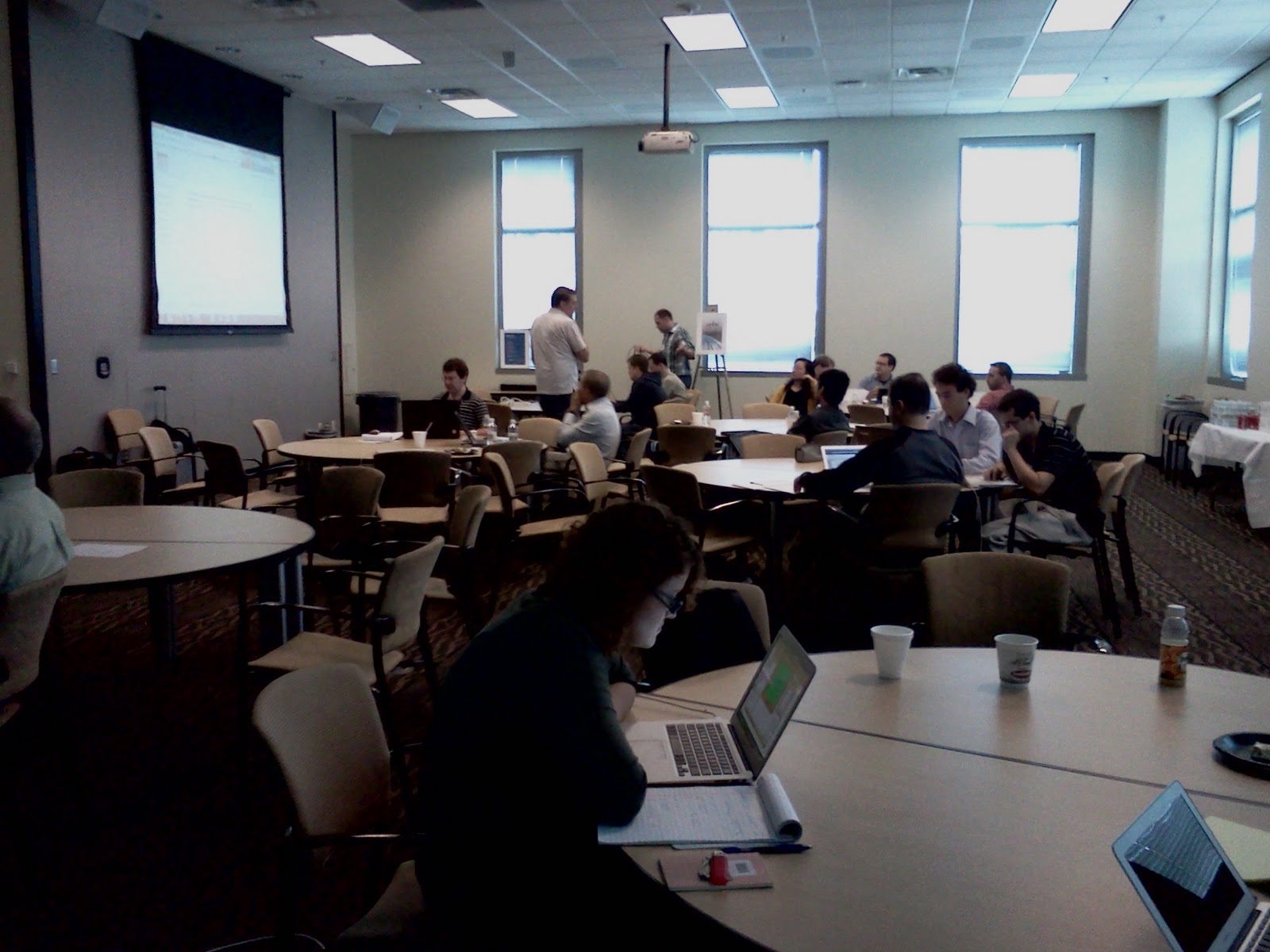
    • Groups: The organizers put people in groups of 3 – 5 at round tables and gave each group a set of topics and a shared Google Doc to work together in. The Google Doc had question samples that could be copied and pasted to create new questions. Math was entered in TeX math which most of the participants already know and use fluently. It is a dense notation that can be converted to attractive equations.
    • Creation: Groups worked for 2 hours creating questions.
    • Signaling completion: When a question was finsished, someone would highlight it in green.
    • Uploading to the question banks: A separate group of four people spent the whole day watching for the green highlighting and then copying the questions into the two different question banks. It was labor-intensive, but meant that every question could end up in both banks despite each bank having slightly different formats. It also meant that participants didn’t have to learn new tools.
    • Review: Then groups reviewed the questions for 1 hour. Two groups merged to do the review (thus making groups of 6 to 10 for the review. They would edit the questions to improve them.
    • Repeat: The whole process was repeated in the afternoon.

    My observations

    • Pre-workshop prep not done. Very few participants brought existing materials. So it looks like it is important that success not require preparation.
    • Paper collaboration: Groups collaborated on creating questions by drawing on paper and talking about them. They did not collaborate directly in the Google Docs. Individuals would write up entire questions in the doc and then highlight them green to signal the uploaders.
    • Review by reading and solving: To review the questions, recall that two groups would merge or swap. So groups 1 and 2 would review together. Group 2 would review group 1’s questions and perhaps ask some questions about the intention for each question. Then group 2 would actually solve all of group 1’s questions. And of course group 1 would be doing the same with group 2’s questions.
    • Review resulted in considerable change: The review process resulted in substantial revision of the questions. Revisions occurred for clarity, correctness (after solving), and also for transcription errors as the questions got put into the question banks.
    • Pedagogy benefits: In addition to the creation of a large body of questions that are now globally available and shareable, the process itself was valuable as participants discussed and reviewed and improved the questions. Thus the time that participants donated to the sharing process was also valuable pedagogically.

    Sprint artifacts

    Want to learn more?