Author Archives: kathifletcher

Open Ed 2012 : Preliminary Results of Testing the OERPUB Editor designs

Chinese food in Vancouver

Open Ed 2012 just closed in Vancouver and I wrote this on my way home while looking forward to the community of family. I am extraordinarily lucky to work with a group of smart, passionate, and creative colleagues, whose hard work paid off for us handsomely in Vancouver. We were bringing designs for what we hope is a sustainable approach to authoring education resources that can be remixed, adapted, improved, and extended.

Since Open Ed attracts a diverse community of educators, technologists, and visionaries, we brought with us two things we wanted to vet. We wanted to learn from this group and attract partners to our effort, and we have succeeded in both. First, we brought high-fidelity (which here means it looks great and parts of it work :-)) mockups to test with authors at the conference. Secondly, we brought a technical architecture and working prototype for delivering the features in the mockup as extensible, open-source software. In addition to me, two of our user interface designers, Max Starkenburg and Adrian Garcia, came and also acted as test monitors and test analysts. We recruited Megan Beckett from Siyavula to our cause since she was already coming to talk about Siyavula’s textbooks, community authoring, and badges. She helped beta-test and refine the tests, and then even acted as a test monitor for one of the days. To convey the technical architecture, two of the leading developers on the project, Marvin Reimer and Phil Schatz, joined and talked with anyone who cared about the technology, which turned out to be a substantial number of
people and projects at the conference. 
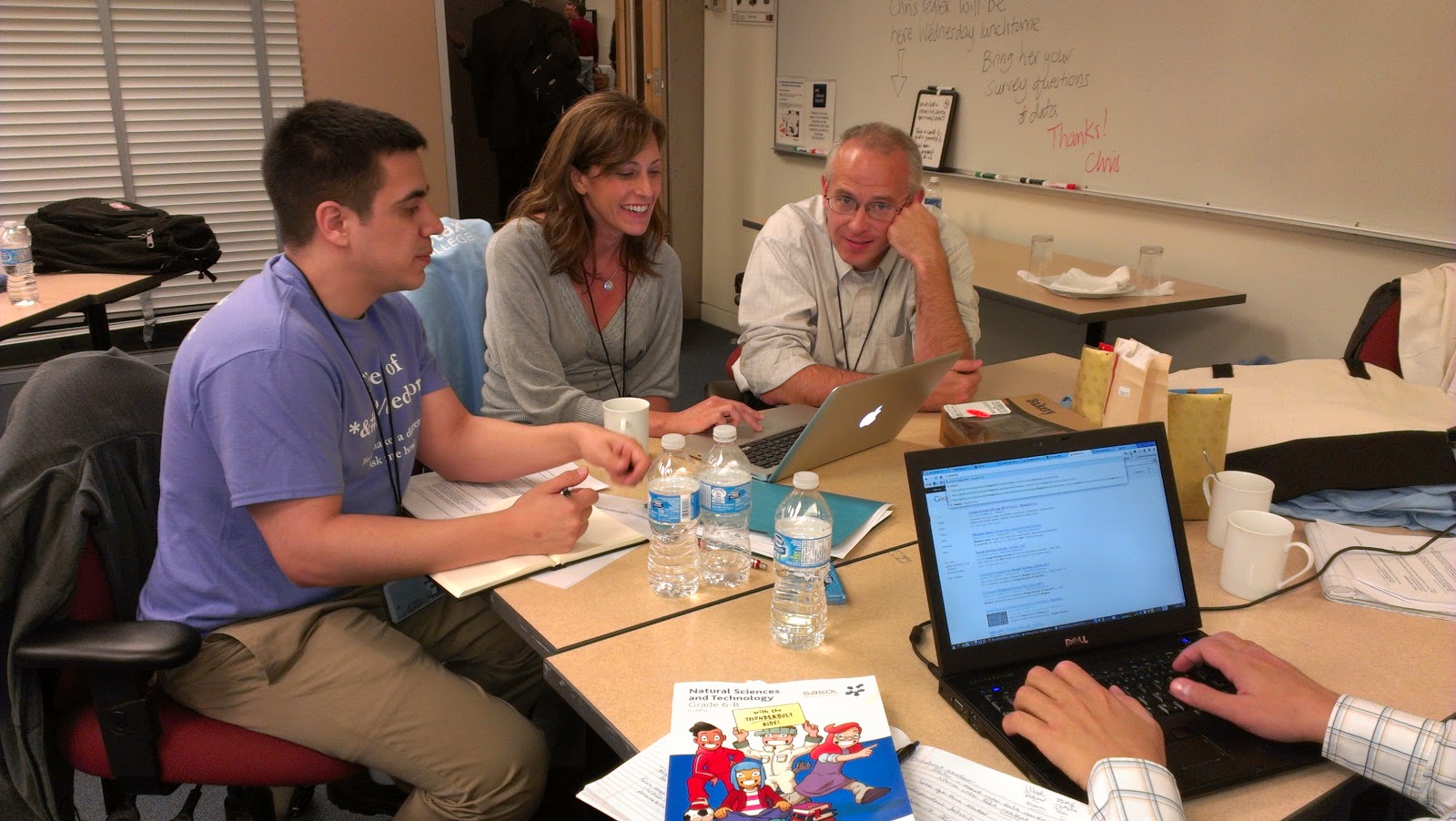
Testing the interface at OpenEd.

We had close to 30 people go through the tests of the editor! People spent between 15 and 45 minutes helping test. For the curious, here are the tasks they were given.

What we learned. Well, Adrian and Max and Megan have lots of data we haven’t yet gone through, yet, but we spent Thursday evening after the conference working through the highlights. Our overall System Usability Score was a solid B, which seems like exactly where we should be right now. Our ambitions are sky high and the best design principals have to be tested.  

Analyzing the results (qualitative)


Things that tested well : the approach to math editing, the math cheat sheet, the drag and dropping of semantic features, the highlighting box and options gear-icon.

Things that need some rethinking (luckily with a whole lot of user data to inform them): the exact way we presented image sourcing information was confusing and needs a rework. Some people loved it, but some people didn’t understand it. One of the semantic features we tested was “exercis
es”, the Connexions inspired structured question/answer format. The naming of the parts wasn’t intuitive. The other interesting problem was that in the editor the solution to the question shows directly below the question. Authors didn’t like that one bit, because they don’t want readers to see the solution right there. Earlier designs hid the solution, but they were jumpy, so we need to figure out how to cleanly show that the solution will be hidden from readers. We had a major problem with table editing — no one could find how to add/delete rows. This one is so easy to fix, though, because we know everywhere people looked for it and we will just make those work. That is the beauty of this kind of testing.

Engaging new partners: Since we have designed the editor so that it can be embedded in a wide-variety of projects, built
it on Aloha, an HTML5 editor with active contributors, and since the underlying format of the content is HTML5, we were successful in enticing the serious interest of other projects at the conference. There is still a lot of hard work to successfully engage participation and move forward. I am looking forward to that process. It has been my dream for this project since the beginning.

Open Ed 2012, Vancouver, Invitation to talk and User Interface Testing

We are proud to present our newest OERPUB importers at Open Education for Education 2012 in Vancouver! If you want to see them in action, create an account at the Open Repository cnx.org and start importing and transforming your Google Docs, Word or MS Office files or even webpages here: remix.oerpub.org.

Our motto for authoring educational content is:

Everything in, Everything out, Everywhere.

Find out what that means at Kathi and Marvin’s talk at 

We are currently creating a WYSIWYG authoring tool for easily remixable OER. It works with Connexions out of the box, and the new HTML5 format means you can customize it to work in other projects and content repositories.

We are testing the editor here at Open Ed. Come help us, and have a cookie, in room C215 at 

  • 2:00 pm Tuesday
  • 1:30 pm Wednesday
  • 10:30am on Thursday

Source: http://www.flickr.com/photos/shardsofblue/5875237526/in/photostream/
Image by Shades of Blue, Roxanne Ready. Used by Creative Commons license.

Usability goals for the editor:

  1. The editor must support the incremental development of educational content.
  2. The editor must be self-explanatory enough so that novice (first time) users can edit without training, yet powerful enough so that experienced users are efficient. Experienced users those who have published 5 modules, or 1 textbook, or that have received training.   
  3. The editor must support the activity of infrequent users by leading the user by hand through tasks when necessary, so they need not remember details of proper procedure between uses.
  4. The editor must be designed free of cultural assumptions to be used by persons from diverse cultures and geographical locations.
  5. Using the editor should not require knowledge of the underlying technology.
  6. The editor should be fun to use by all groups of users.
  7. Authors that create educational content should think they would like to use the editor to create content for learners.
  8. Authors’ content should evolve toward more semantically rich “markup”. For example, over time using the editor should result in increased use of headers, exercises, examples, and notes. Authors’ images should be more likely to contain descriptions that aid visually impaired learners. Author’s tables and images should be more likely to include titles, captions, and source information.

 See some videos of our work with the editor:

Please vote for our SXSWedu 2013 panel

Panel Picker iconI am the organizer for a SXSWedu panel, Advances in Open Textbook Publishing, that will show off new OER authoring tools, production pipelines, and interactive content visualizations. I will be talking about authoring OER in a remixable way and show examples from the OER community. Connexions will show off their new editing tools and innovative production pipeline for beautifully formatted textbooks. And we will be showing off new ways of enriching content with interactives taking advantage of new web technologies and connections between OER sites.

Questions we will answer

    1. How do you make creating, sharing, and remixing open textbooks easy, without sacrificing quality?
    2. How do you produce beautiful and engaging textbook content and distribute it to any student on any device in many formats?
    3. How will future textbooks engage students by taking advantage of new web technology and new connections between OER from many providers?

      Creating and editing math: Can we get away with a lazy first cut?

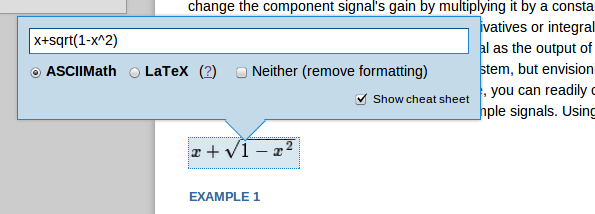
      Mockup showing an equation, x plus the square root of  parens 1 minus x squared. An input box shows ASCIIMath code that the author uses to create the equation.
      If you would like to see a 2 minute video showing several quick workflows, please scroll to the end of this blog.

      Editing math: How lazy can our interface be and still be really useful to authors?

      My team (in conjunction with several other projects) is creating a web based editor for creating open education resources (OER) that can be adapted and remixed easily. My post from a design and coding sprint in Berlin details some of the principles we are using to keep the editor easy to use, easy to learn, and easy to customize.

      For teaching math and science, being able to include equations that display well online and in print is critical. We do have ways of including math in OER that display well online and in print via MathML and tools like MathJax. We still need a way, though, to make it relatively easy for authors to create and edit those equations. Along the way we have learned a few lessons, and come up with a few things we think are true.

      Lessons

      1. It is hard to build a WYSIWYG math editor that is easy for novices to learn and use, and efficient for experts. More importantly, we aren’t likely to be the ones that get it right. Mathematica, Design Science, Google, or Daum Equation are much more likely than us. So, ultimately, we hope they solve the problem in a way that can be used in our editor.
      2. Integrating someone else’s editor has a bunch of technical fiddly bits that are just not doable, … yet. It might not be open source, or it might not have have an API we can easily apply. It might be hard to get the math out in a format that we need. We need MathML, because it works with screen readers and with a bunch of other tools we use to produce online versions as well as epub, kindle, and pdf formats. Or it might not be complete enough to satisfy authors teaching advanced mathematics.
      3. Math authors are used to compact notation and are willing to learn new ones. Thus we are conjecturing that they don’t require an equation editor that is fully WYSIWYG and drag and drop. In fact we are conjecturing that they would be willing to use one of two math notations, LaTeX and ASCIIMath. College faculty and upper level students often already know LaTeX.
      4. Live or really fast preview is still important. One of our partner projects, Siyavula, has done workshops with high school teachers and found that they are indeed willing to learn a new math notation. But being able to see that what they are typing is correct is really important. Even experts benefit from live preview. (For a really cool look at what instant feedback does for programmers, watch Bret Victor’s talk and demo, “Inventing on Principle”.)

      How we have applied these lessons.

      Modest ambition and live preview: First, we aren’t trying to build a WYSIWYG math editor. Instead we are building an editor that will accept LaTeX or ASCIIMath notation and will produce a live preview of how the math will look. We use MathJax to do most of the heavy lifting.

      Shows an equation with an entry box to enter code to produce it.

      Make it easy to learn: For authors who don’t know the notations, we are providing a cheat sheet with common notation that can be cut and pasted into equations. In future versions of the editor, these cheat sheets can be specialized by scientific or mathematical domain. We are also thinking of recommending Daum equation editor as a way to create LaTeX that can be cut and pasted into our equation editor. We will be testing how to make that workflow as efficient as possible.

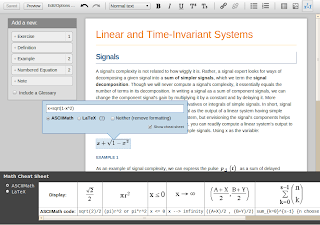
      Cheatsheet that provides math snippets and their equivalent ASCIIMath code
      Click to see a larger view.

      Support varied workflows: Authors can enter equations in two different ways. They can click on the math button and a preview and entry box will appear where their cursor is in the document. Or they can just type in one of the two legal codes (ASCIIMath or LaTeX), highlight, and press that math button to automatically convert it to math and show the preview. Finally, math in the document hightlights and shows a small plus sign as authors get near them in the document. Clicking on them brings the editor back up for adding and improving the equation.

      Overall picture of the editor to provide a place to click for a workflow video.
      Click on the image to see a short video (less than 2 minutes) with three ways to edit math. 1. Edit an existing math equation. 2. Highlight some text written in one of the supported codes, and turn it into math. 3. Add a new bit of math. For the last example, the preview will be live as you type, but the mockup doesn’t show the live preview. Also, the video capture doesn’t show the tooltips that pop up as you hover over the math.

      Credits

      All of this work has depended on the creative and technical talents of our user experience team (Adrian Garcia, Max Starkenburg, Esther Luk), our incredible student interns that have appeared in other posts (Max Grossman, Gbenga Badipe), and the participants at the sprint we had in Berlin, especially Nicola du Toit of Siyavula who shared her experience working with teachers and Mihai Balaceanu of Sourcefabric who created the original math demo.

      Collaboration XOR Offline Editing

      pencil writing on paper
      Source: Public domain

      We are building the latest and greatest authoring tool for creating textbooks and other educational material and we need to decide how important it is to support simultaneous collaboration on documents and how important it is to support the ability to edit offline. We also have to decide whether both have to be supported at once. The real question is about priorities. Which have to be done first? Are there shortcuts we can take in early versions, that still provide real value to authors?

      So, first, we need to understand how real authors work and how these features help. At the development sprint in Berlin this past July, we came up with the following ways that authors use collaboration and offline editing. We used our own experience, but we are mostly programmers and techies. Luckily, we also had Siyavula’s experience running workshops where teachers collaborate to write aligned textbooks, as well as Booktype’s experience with documentation sprints, and also the experience of open journals and newspapers.

      Collaboration benefits (How simultaneous must collaboration be?)

      • One version to rule them all: One of the most important benefits of online document editors is that you don’t have multiple versions of documents being emailed around and dug up from many people’s computer hard drives. Everyone can see and access the current version. This suggests that a single online version would be useful, even if only one person could make changes at a time.
      • Simultaneous edit, but different jobs: One person may be creating and another one editing for style. Or one person may be authoring text while another finds images and media. This suggests that it would still be useful if the editor”locked” small regions of a document and let only one person be in a region at a time. 
      • Commenting: In many authoring workflows, reviewers make comments, but are not actually responsible for implementing the changes. The author retains that right/responsibility. Annotation systems can serve this need well, without requiring synchronous editing.

      From this use case analysis, we think we see ways to make collaborative editing work well for authors without using sophisticated conflict-resolution techniques needed for true simultaneous editing. You can allow true simultaneous editing within text-only portions of the content (because open-source libraries exist for that). But you can use locking on the structure of individual semantic units so that two authors can’t change the same figure/exercise/glossary entry at the exact same time. And therefore you don’t have to write custom conflict resolution. But then to complicate things, what about offline editing?

      Offline editing

      • Internet access is not ubiquitous everywhere. Offline editing really can be critical in places where authors may go home from a workshop and not have high-speed access.
      • Productive use of wait time: Offline access is extremely useful for editing and composing while travelling and waiting. Life provides us all many opportunities to wait. OER could benefit from all that wait time.

      Offline editing can be supported by HTML5’s ability to store data locally in the client browser. Upon reconnect, the changes are applied to the document.

      Both simultaneous editing and offline editing have important use cases. But if you allow offline editing AND collaboration, then the lazy collaboration we propose above won’t work, because the structural locking can’t be done. And we want to be as lazy as possible so we can get the most functionality out to authors as soon as possible.

      The big question: Is it possible to provide authors the ability to do offline editing OR collabrate, but not both? 

      For single authors, offline editing could be enabled, and collaboration disabled. That gives them the ability to write whenever and wherever. But if they want to get reviews or work on content as a team, then offline editing would have to be disabled. Would this work?

      P. S. How important is Revision history?

      • Source-code style revision not used by most authors: From our observations of our own behavior with tools like Google Docs that support fine-grained document revision histories, and from observing teachers at workshops, most people are not using the revision history to find out what changes happened when and trying to apply source-code like merge/accept/reject. For contracts these functions are used extensively, but for educational content, not so much.
      • Seeing what the last editor did is useful. When someone makes edits though, being able review just their edits is extremely handy. But this feature is frustrating if you have to scroll through a long document to find those edits. And often there appear not to actually be any changes. 

      For now, we are not planning to tackle revision histories. But we are interested in techniques that others come up with, especially if they are author-centric : designed and tested with real authors. I just don’t think that the same things that work for programming will work for writing.